
Documentation/Automations
Built-in flows
24 ready-made automations you can switch on in a few clicks.
A flow is an automated journey. Instead of sending one message to everyone at once, it reacts to what each person does — joining a list, abandoning a cart, going quiet — and messages them at the right moment.
Automations → Built-in Flows is a catalog of 24 ready-made automations covering 64 emails in total, each based on a proven marketing pattern.
What each card shows
- Category and a plain-English description
- Trigger — the event that starts the flow
- Emails — how many messages are in the sequence
- Avg. Open and Avg. Click — benchmark performance for that flow type
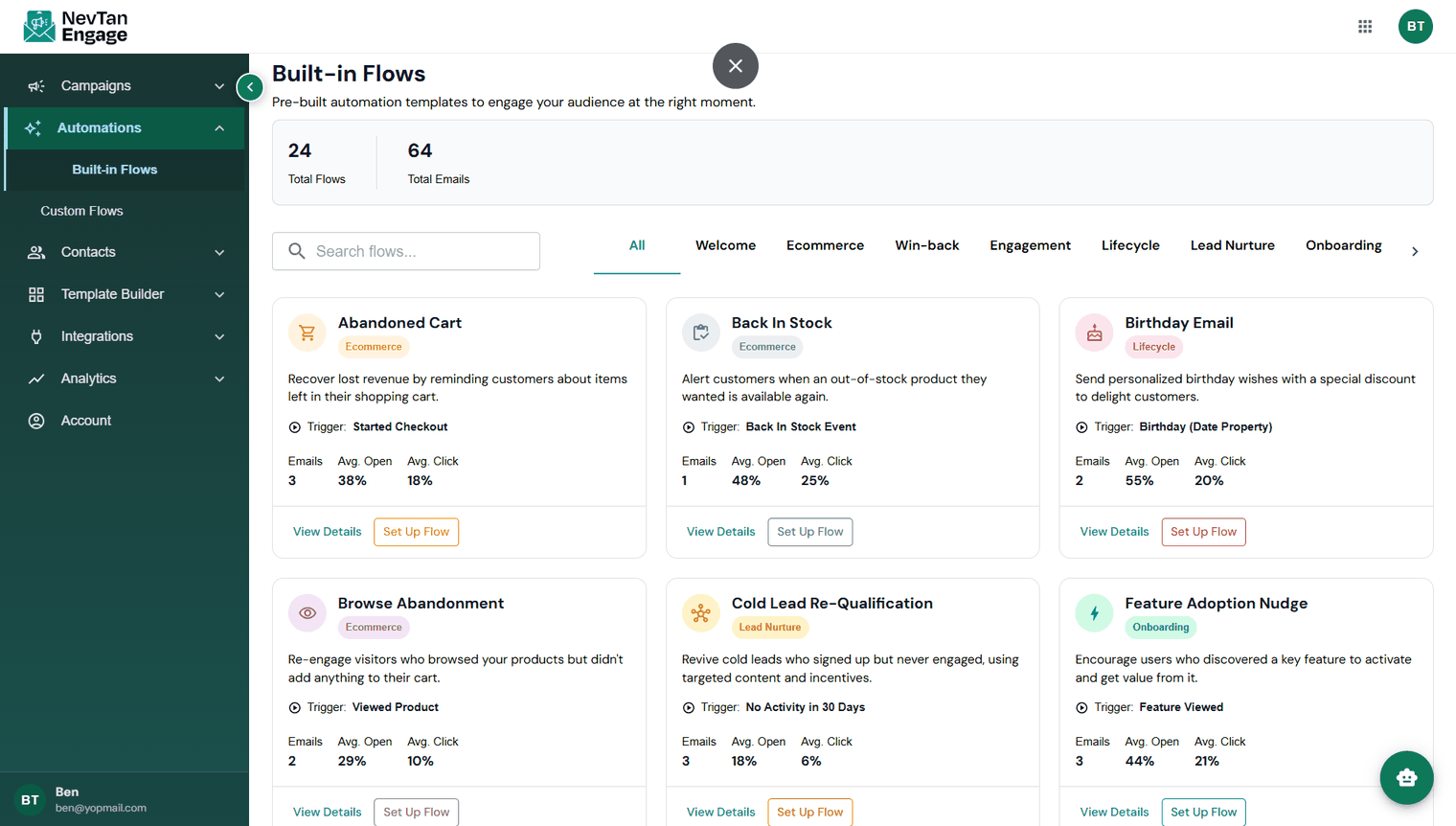
24 ready-made automations
Those open and click figures are benchmarks for the flow type, shown to help you choose. Your own results appear in Automation Reports.
Set one up
Find a flow
Browse, or filter by category — Engagement, Lifecycle, Lead Nurture, Onboarding, and more.
Click View Details
See the full email sequence, its timing, and the trigger.
Click Set Up Flow
Engage copies the flow into your account.
Configure it
Choose the list or segment it applies to, and pick or edit the templates for each email.
Activate
It now runs automatically whenever the trigger fires.
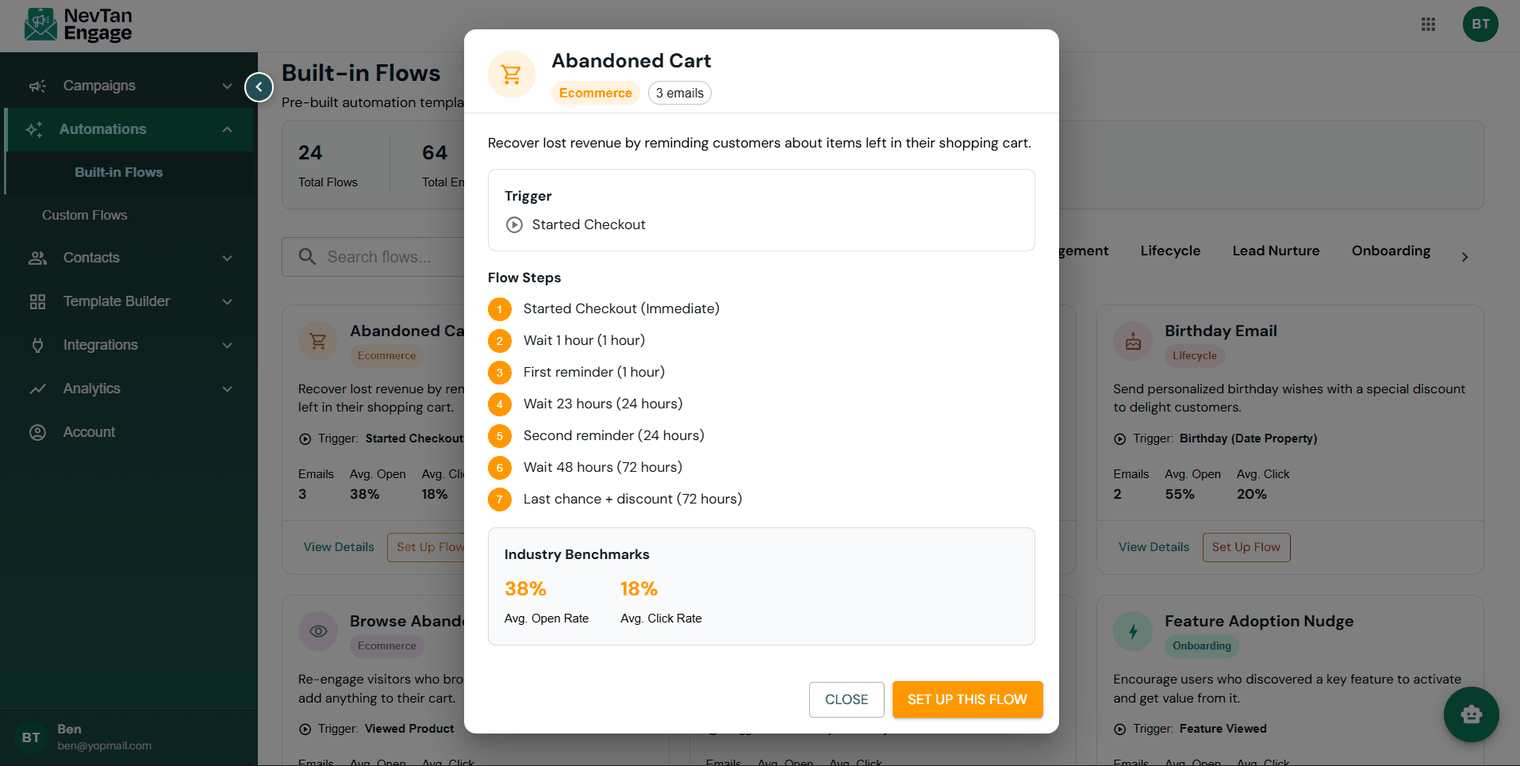
The full sequence and its timing
The catalog
Welcome & onboarding
| Flow | Trigger | Emails | Open | Click |
|---|---|---|---|---|
| Welcome Series — greet new subscribers | Joins a List | 3 | 42% | 12% |
| SaaS Product Onboarding — guide users to first success | Account Created | 5 | 57% | 24% |
| Feature Adoption Nudge — activate a key feature | Feature Viewed | 3 | 44% | 21% |
Ecommerce
| Flow | Trigger | Emails | Open | Click |
|---|---|---|---|---|
| Abandoned Cart — recover items left behind | Started Checkout | 3 | 38% | 18% |
| Browse Abandonment — re-engage browsers | Viewed Product | 2 | 29% | 10% |
| Post-Purchase Follow-up — reviews and repeat sales | Placed Order | 4 | 51% | 15% |
| Back In Stock — alert when a product returns | Back In Stock Event | 1 | 48% | 25% |
| Price Drop Alert — notify on a price cut | Price Drop Event | 1 | 45% | 22% |
Lead nurture & conversion
| Flow | Trigger | Emails | Open | Click |
|---|---|---|---|---|
| New Lead Nurture — warm leads over two weeks | Joins a List | 5 | 34% | 11% |
| Trial-to-Paid Conversion — convert trial users | Trial Started | 5 | 41% | 19% |
| Cold Lead Re-Qualification — revive dormant leads | No Activity in 30 Days | 3 | 18% | 6% |
Retention & engagement
| Flow | Trigger | Emails | Open | Click |
|---|---|---|---|---|
| Win-Back Campaign — re-engage lapsed customers | No Purchase in 90 Days | 3 | 22% | 8% |
| VIP / Loyalty Reward — reward top customers | Order Value > $500 | 2 | 58% | 28% |
| Sunset Unengaged — retire long-inactive subscribers | No Open in 180 Days | 2 | 15% | 4% |
| Birthday Email — personalized wishes and a discount | Birthday (Date Property) | 2 | 55% | 20% |
Transactional, referral & events
| Flow | Trigger | Emails | Open | Click |
|---|---|---|---|---|
| Order Shipped Notification | Order Shipped | 3 | 62% | 18% |
| Payment Failed Recovery | Payment Failed | 3 | 49% | 27% |
| Referral Program Invite | Placed 2nd Order | 2 | 46% | 23% |
| Referral Reward Delivery | Referral Converted | 2 | 68% | 31% |
| Webinar Registration Drip | Registered for Webinar | 3 | 53% | 22% |
| Post-Webinar Follow-up | Attended Webinar | 4 | 61% | 26% |
SMS
| Flow | Trigger | Messages | Open | Click |
|---|---|---|---|---|
| SMS Abandoned Cart (Quick) | Started Checkout | 1 | — | 31% |
| SMS Appointment Reminder | Appointment Scheduled | 1 | 30% | 9% |
| SMS Flash Sale Alert | Flash Sale Event | 1 | 35% | 15% |
If you turn on one automation, make it the Welcome Series. New subscribers are at their most engaged in the first 48 hours, which makes it the highest-return flow most teams run.
Built-in flows require a Starter plan or above.